
A terminal written in Rust: macOS, Windows and Linux today, iOS and Android planned. On a Mac with Apple Intelligence the AI runs completely offline.
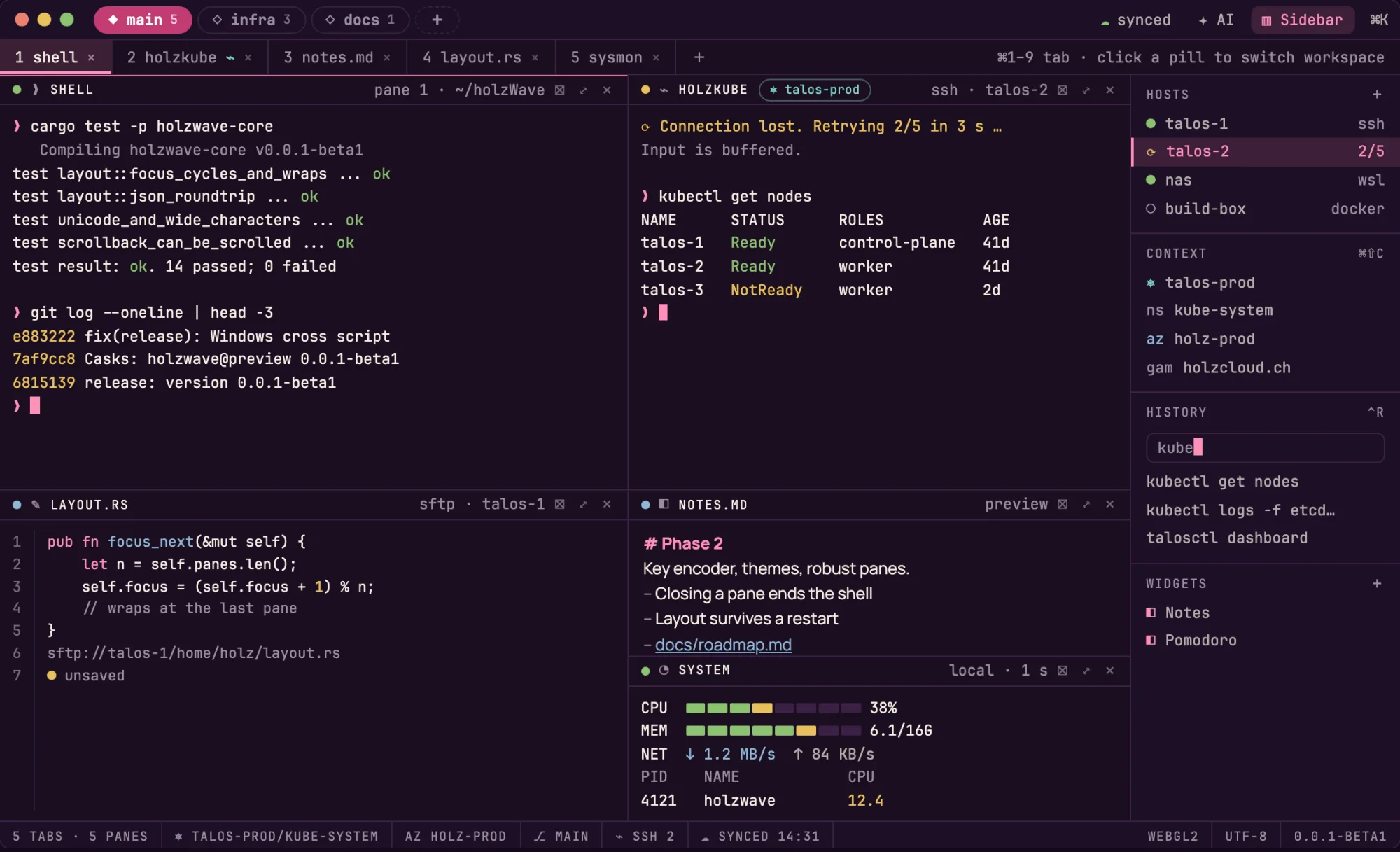
One core, five platforms
Terminal, layout, connections and sync live in one Rust crate. Packages for macOS, Windows and Linux exist today and the author has tested all three; iOS and Android are planned.
AI completely offline
On a Mac with Apple Intelligence the AI chat runs on the device: no account, no key, nothing leaves the Mac.
Fast, measured
The WebGL2 renderer draws a 160×50 grid in about 1 ms; Canvas 2D takes 4.5 to 7.7 ms.
Your own sync
Through your own Nextcloud, end-to-end encrypted. Built; not yet tried against a real Nextcloud.
Beta, preview (0.0.1-beta1). The current preview is a GitHub prerelease with packages for macOS (Apple Silicon), Windows (x64) and Linux (x86_64). The author has tested it on all three systems. Nothing is signed or notarised. A beta is under heavy development and can break. The images on this page show the design for the release; the table below says what is built today. The source is on GitHub.
holzWave is a terminal emulator with tiled panes, tabs and workspaces. It connects over SSH and reconnects, opens files and previews next to the shell, syncs its settings through your own Nextcloud, and has an AI chat that sees your terminal only after you share that pane. On a Mac with Apple Intelligence this chat runs completely offline on the device.
holzWave is inspired by Wave Terminal, which is the reference for how it should feel to use. It began as a fork, is now a project of its own and contains no code from Wave. It is independent and neither affiliated with nor endorsed by the Wave project. Anyone who wants a finished terminal of this kind today should use Wave, and can support it.
Features
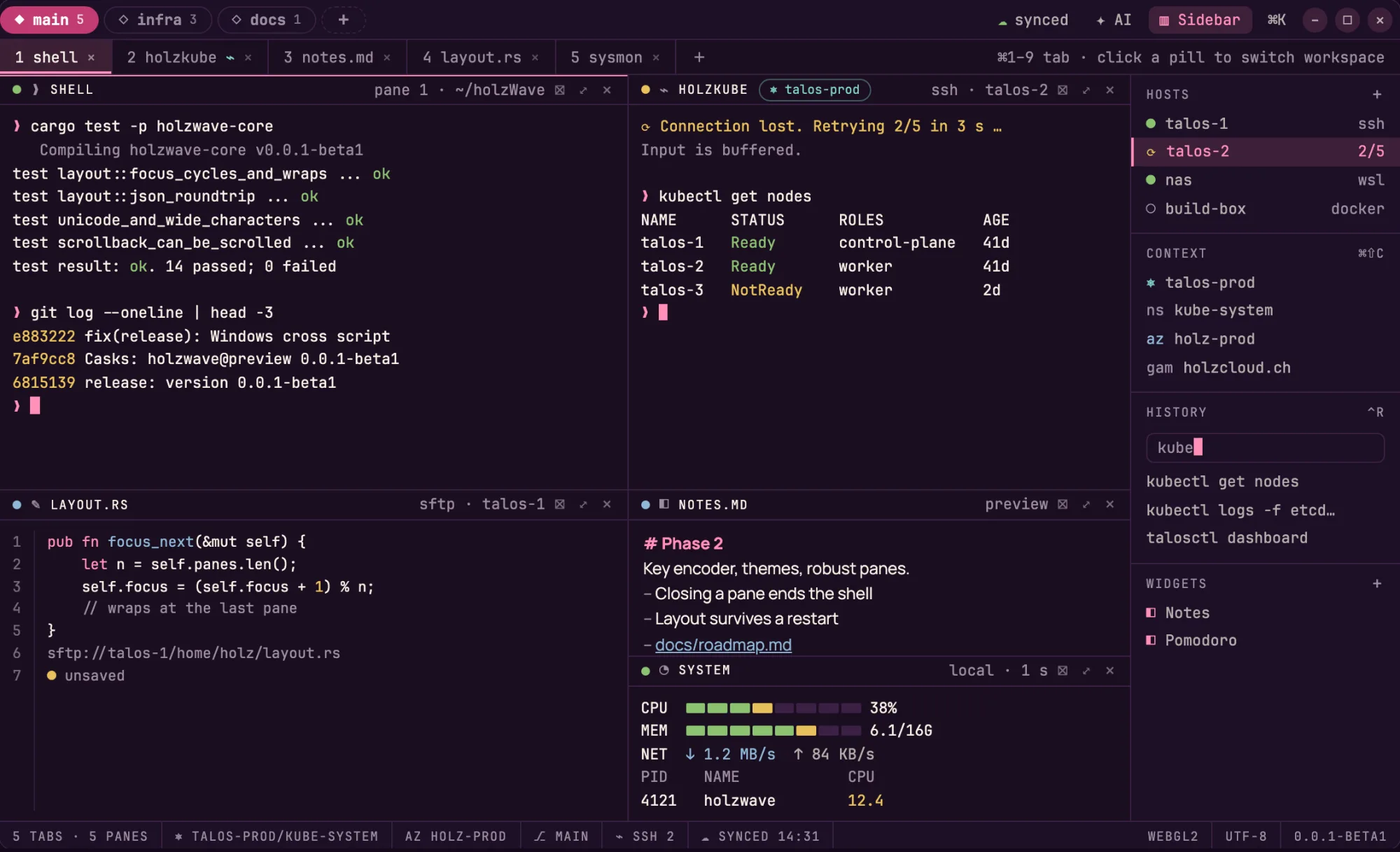
Workspaces, tabs and tiles
Three levels with a shape of their own: workspaces are round pills with a diamond in the title bar, tabs are numbered and sit in a row below, and panes are tiles with movable dividers. The layout survives a restart. This runs on macOS, Windows and Linux. The picture shows the same window on Linux. holzWave draws the window bar itself, with the same values on every platform.
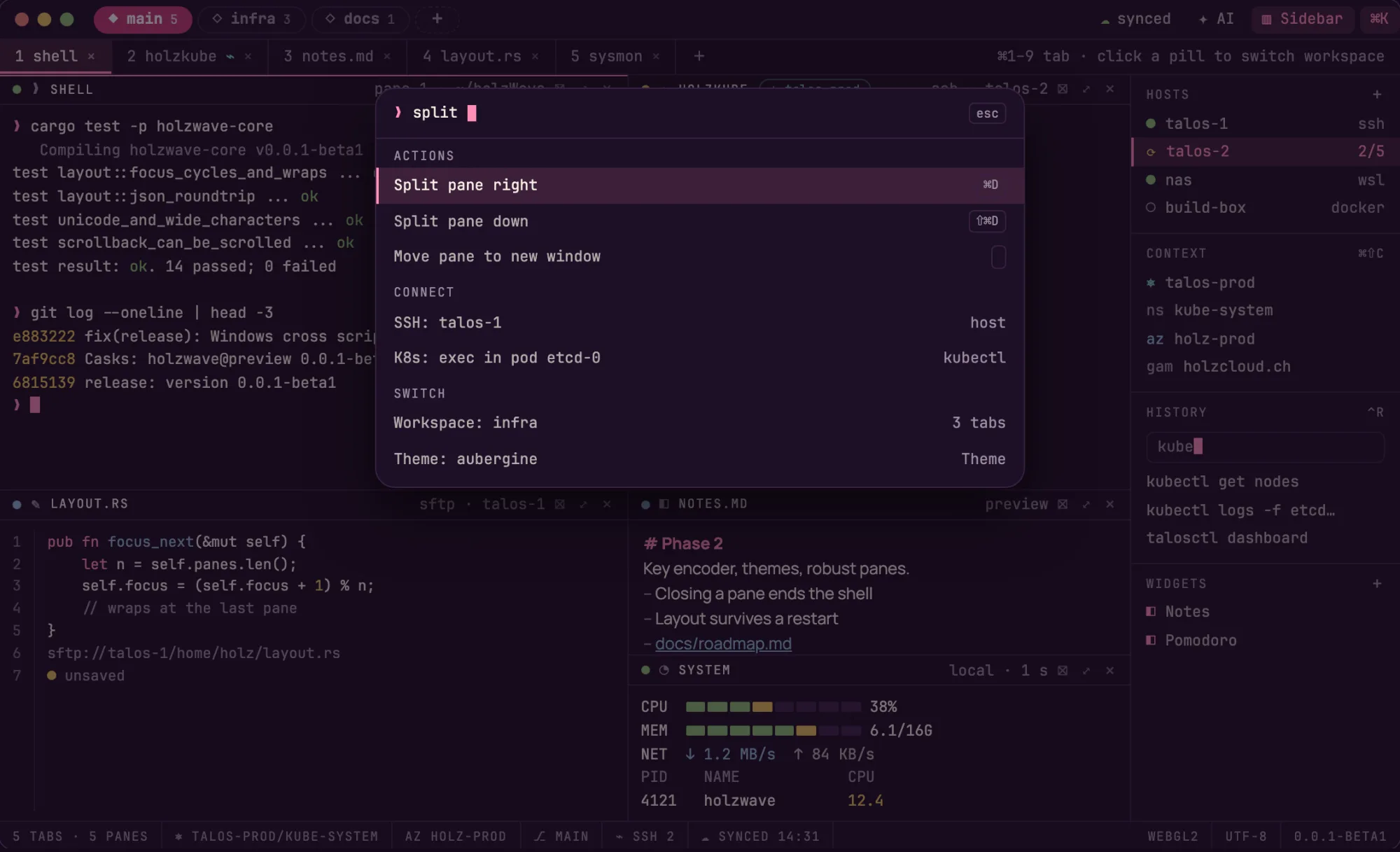
The command palette
Actions are found by name with a fuzzy search that opens with a shortcut (⌘K on the Mac). The picture shows the grouping of actions, hosts and workspaces.
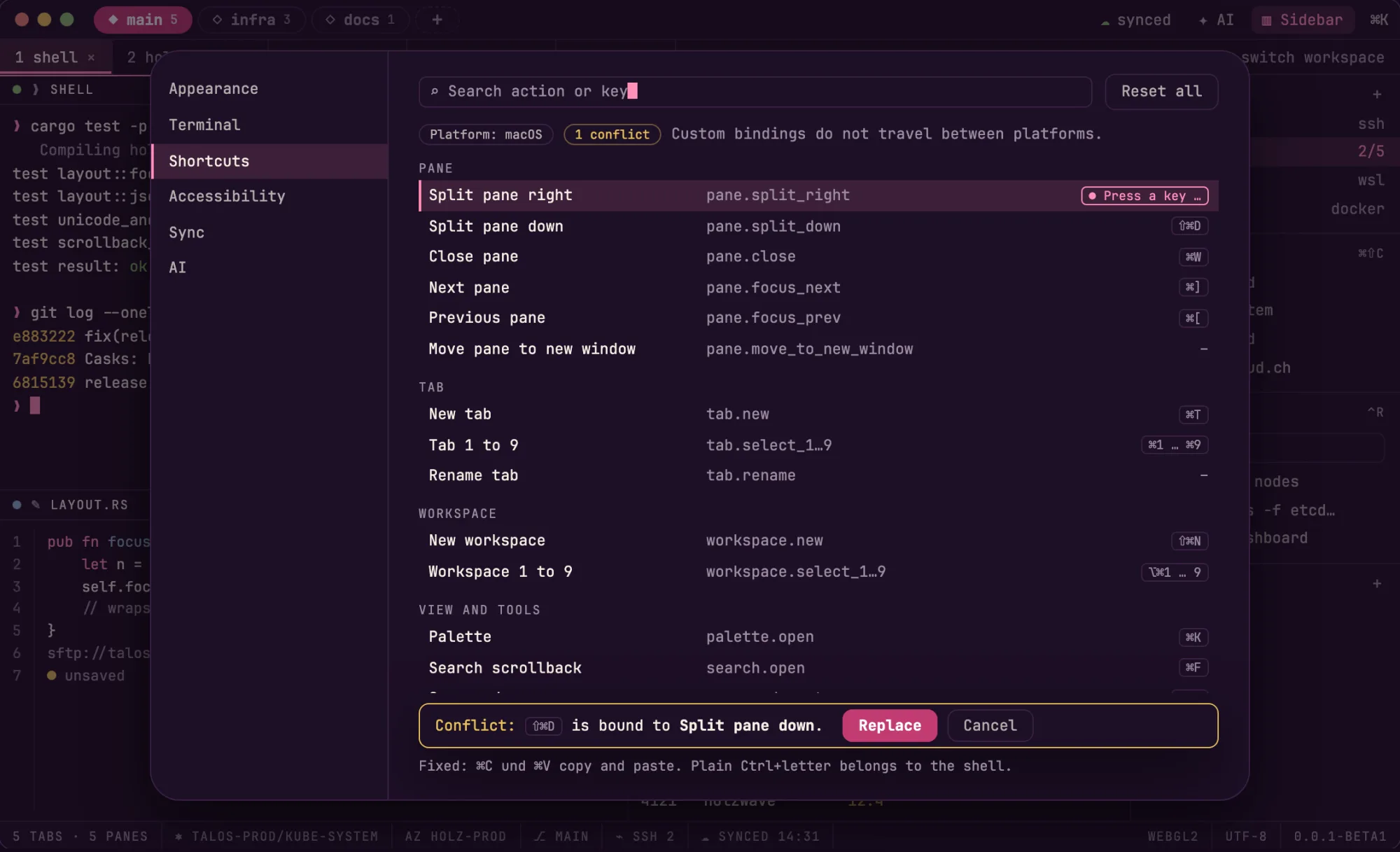
Shortcuts you can change
Every action has a default for each platform and can be rebound in an editor that records the key and shows conflicts before it replaces anything. Plain Ctrl+letter stays with the shell.
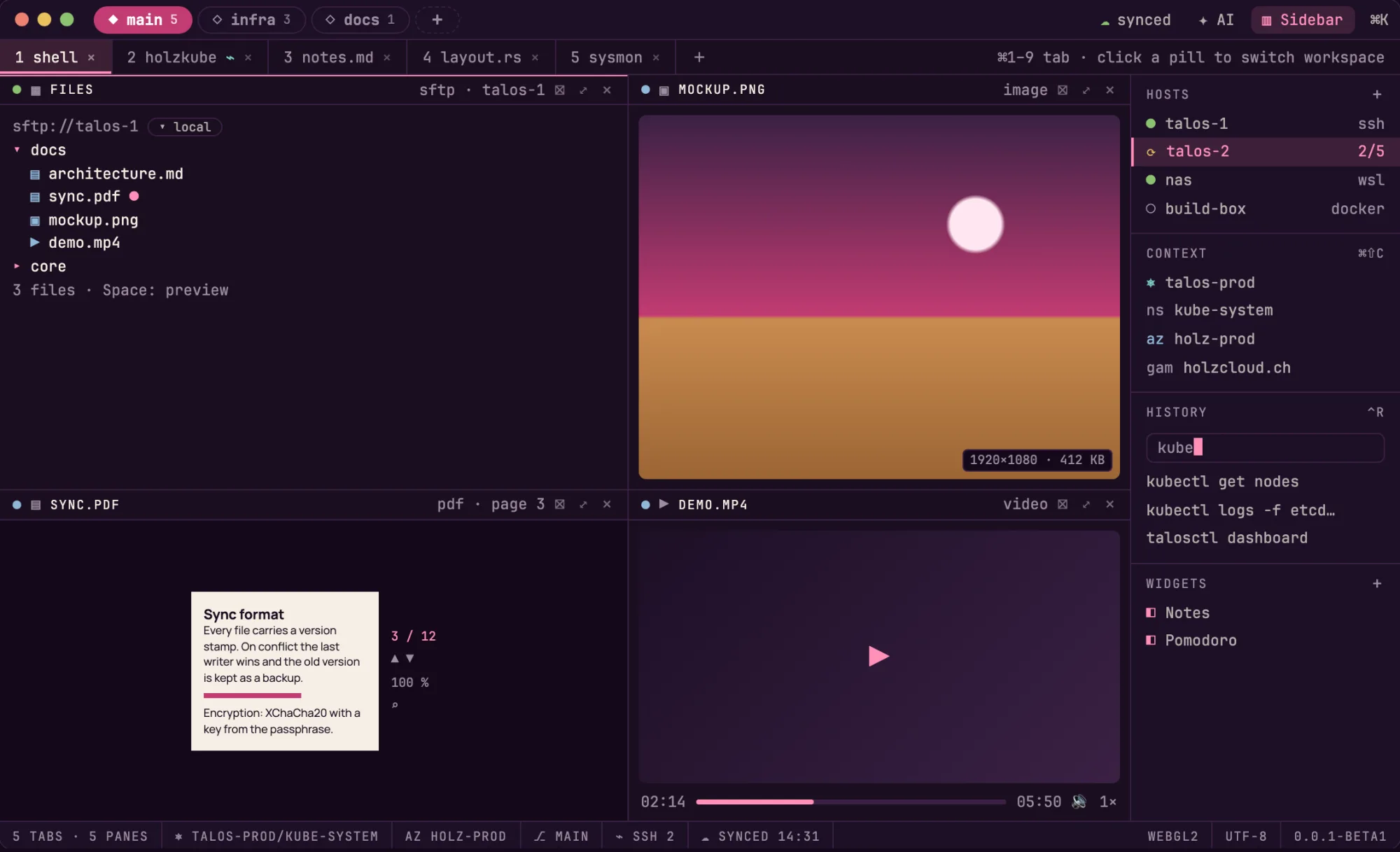
Files and previews
A file browser for local files and for SSH hosts (SFTP), with images, PDF, video, audio and Markdown as panes of their own, and a code editor that saves locally and over SFTP. Built and tested against a test server; not yet against real hosts.
SSH, sync and the sidebar
A pane can run a shell on another machine over SSH, with a jump host, host-key checks and a reconnect that keeps the pane; WSL and Docker open as panes too. Passwords and keys live in the system keychain only. A small wsh command in the shell opens files and previews in the window. The sidebar shows saved hosts, a searchable history of your commands and widgets (notes, a timer, your own command lists), and a system monitor shows this computer and Linux hosts over SSH. Settings, themes and layouts can sync through your own Nextcloud, encrypted before they leave the computer. All of this is built and tested against test servers; it has not been tried against real hosts or a real Nextcloud yet.
An AI chat that asks first, and runs completely offline on the Mac
A chat in a pane, in the sidebar, in the palette and in the shell with wsh ai. On a Mac with macOS 26 and Apple Intelligence it works with the on-device model completely offline: no account, no key, and nothing leaves the Mac. It also works with Anthropic, OpenAI and Gemini, with local servers such as Ollama, LM Studio and llama.cpp, and with AI gateways. It sees terminal output only after you share that pane, every message shows what goes out, every action that changes a file or runs a command needs your approval, and keys stay in the system keychain. The providers are tested against test servers and scripted providers; not yet against real providers.
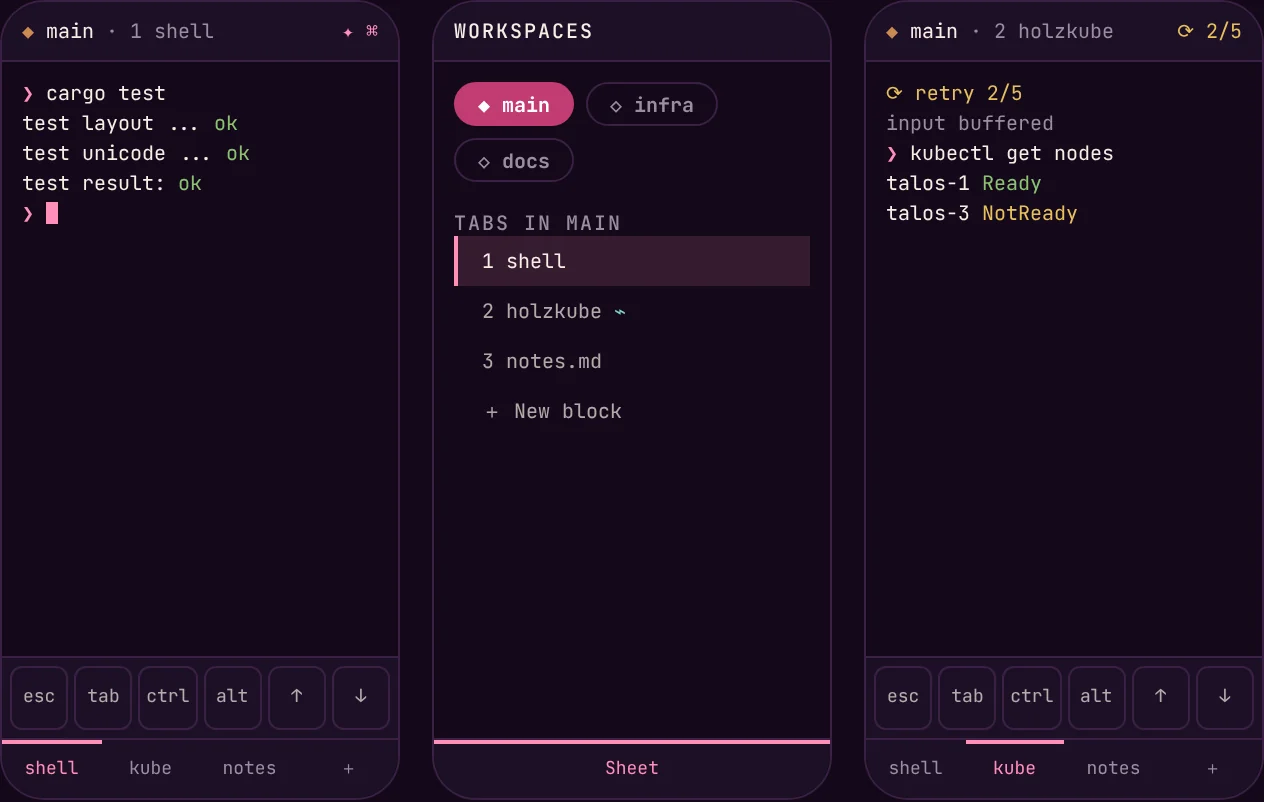
On the phone
One pane per screen. Workspaces and tabs move into a sheet from the bottom, and above the system keyboard sits a row with esc tab ctrl alt ← ↑ ↓ →. On iOS SSH is intended, since the operating system does not allow a local shell. On Android a local shell and SSH are planned. Both are not built yet.
What works today and what is coming
✅ built and run by the author · 🧪 built, tested against test servers, not yet against real hosts or providers · 🔜 planned, not built
| Status | |
|---|---|
| Local shell in a pane, resizing, Unicode with wide characters, on macOS, Windows and Linux | ✅ |
| Tiled panes, movable dividers, tabs, workspaces, saved layout | ✅ |
| Scrollback, selection, copy, paste | ✅ |
| WebGL2 renderer with Canvas 2D fallback | ✅ |
| Command palette, changeable shortcuts, themes | ✅ |
| Completely offline: the on-device AI model (macOS 26 or later with Apple Intelligence), no account and no key | ✅ |
| SSH with reconnect, jump host and keychain, WSL and Docker panes, connection manager | 🧪 |
| File browser, previews and code editor, local and over SFTP | 🧪 |
wsh command, sidebar with hosts, history and widgets |
🧪 |
| System monitor of this computer and of Linux hosts over SSH | 🧪 |
| Encrypted sync over WebDAV/Nextcloud | 🧪 |
| AI chat with Anthropic, OpenAI, Gemini, local servers and gateways | 🧪 |
| Kubernetes, Talos, Azure CLI and GAM7 as blocks | 🔜 |
| iOS and Android | 🔜 |
| Signed packages, Kitty graphics, hyperlinks | 🔜 |
Deliberately left out: a web browser block. Versions run 0.0.1-alpha3 → 0.0.1-beta1 (now) → 0.0.1; alpha and beta are GitHub prereleases. The whole plan is in the roadmap.
How it is built
One Rust crate holds all the state and the webview mirrors it. The terminal engine is libghostty-vt behind a TerminalEngine trait, with alacritty_terminal as a fallback; the engine reads about 290 MiB/s. The shell is Tauri 3 (alpha), the interface TypeScript with no framework and no bundler. Local shells run through portable-pty, SSH through russh, with secrets only in the system keychain. Security-critical code such as the VT parser and SSH comes from established libraries. holzWave sends nothing anywhere on its own: no telemetry, no account. More in the architecture.
Install
holzWave 0.0.1-beta1 is a preview to try out and to report what breaks. All files, each with a .sha256 checksum, are on the release page.
macOS (Apple Silicon), tested by the author
With Homebrew, from the casks in the repository:
brew tap holzcloud/holzwave https://github.com/holzcloud/holzWave
brew trust --cask holzcloud/holzwave/holzwave@preview
brew install --cask holzcloud/holzwave/holzwave@preview
brew trust is needed once per cask. There are two channels: holzwave@preview (the newest alpha, beta or plain release) and holzwave (the newest plain release, from 0.0.1 on; there is none yet). Or take the DMG holzWave_0.0.1-beta1_aarch64.dmg, drag holzWave to Applications, and open it once with right-click and Open. The app is signed ad hoc only (no Developer ID, no notarisation); the cask removes the quarantine attribute so it opens.
Windows (x64), tested by the author
holzWave_0.0.1-beta1_x64-setup.exe: a per-user installer, unsigned (SmartScreen warns: More info, Run anyway). It is cross-built on a Mac and tested by the author on Windows. It needs the WebView2 runtime (part of Windows 11).
Linux (x86_64), tested by the author
holzWave_0.0.1-beta1_x86_64.rpm, holzWave_0.0.1-beta1_amd64.deb and holzWave_0.0.1-beta1_x86_64.AppImage. They are built in an amd64 container on a Mac and tested by the author on Linux. They need glibc 2.39 or newer and WebKitGTK 4.1 (Ubuntu 24.04+, Debian 13+, Fedora 40+). Known issue: the AppImage hands its own library path on to the shell, so programs such as grep or flatpak can print library warnings inside a holzWave pane. Use the rpm or the deb until that is fixed.
Build from source
To build it yourself instead of installing the preview. On macOS (Apple Silicon):
brew install rustup zig@0.16 node
export PATH="/opt/homebrew/opt/zig@0.16/bin:$PATH"   # exactly Zig 0.16.0
rustup default stable

git clone https://github.com/holzcloud/holzWave
cd holzWave
npm --prefix app ci && npm --prefix app run build
cargo run -p holzwave-app
It has to be exactly Zig 0.16.0: libghostty-vt is built by Ghostty’s own build.zig, and Zig 0.17 removed an API it uses. For the same reason the crate is pinned by Git revision. Tests: cargo test --workspace. Build guides for Windows and Linux are in the repository.
Where holzWave stands
- Preview quality. The author has tested it on macOS (Apple Silicon), Windows and Linux.
- Much of it has only been tested against test servers and scripted providers, not against real hosts, a real Nextcloud or real AI providers.
- No signing: the macOS app is signed ad hoc only, without Developer ID or notarisation, and the Windows installer is unsigned. Signed packages are planned.
- Tauri 3 and
libghostty-vtare pre-release; their interfaces change. - A single maintainer and deliberately no CI: everything is built and tested locally.
Documentation: architecture, design, roadmap, sync format.
Thanks and licence
Wave Terminal for the idea and the interaction model, and please consider sponsoring Wave if you can. Ghostty for libghostty-vt and libghostty-rs for the Rust binding. The fonts Plus Jakarta Sans, Manrope and JetBrains Mono are under the SIL Open Font License 1.1.
holzWave is under the GPL-3.0. You can support the project through GitHub Sponsors.
More projects
holzkube-manager, the manager for Talos Kubernetes clusters, holzcloud-CMS, the CMS without JavaScript, and holzBar, the menu bar manager for macOS. Back to the home page.